How to Choose the Best Access Control Software for Your Business?
Choosing the right Access Control Software is crucial for any business. Expert Johnson Smith, a leader in security technology, once stated, "The best access control is the one that fits your unique needs." This highlights the importance of tailoring software to specific requirements.
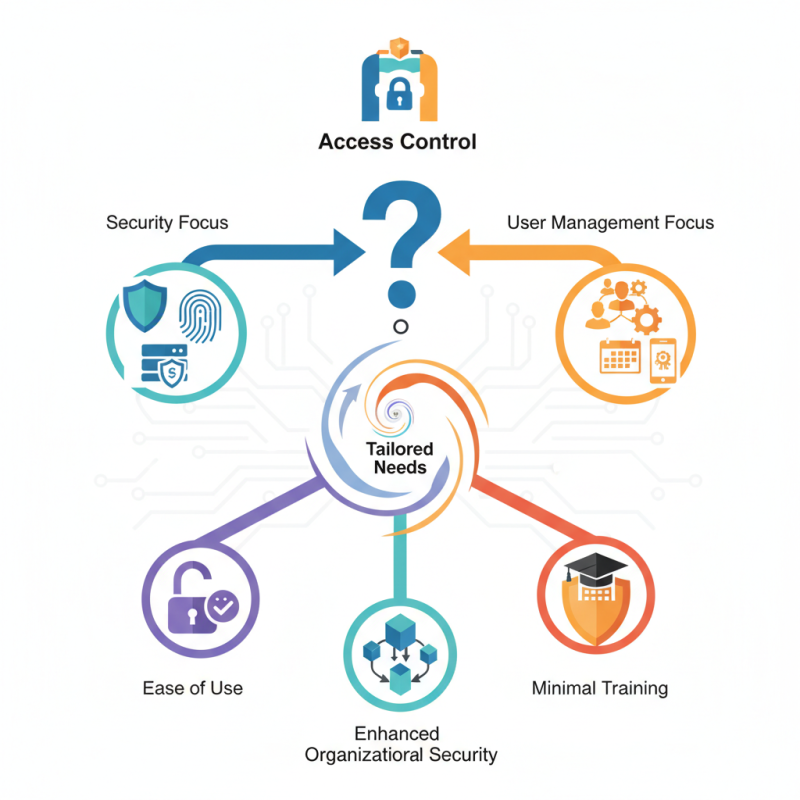
Access Control Software varies significantly in features and functions. Businesses often struggle to identify the software that aligns with their goals. Some may prioritize security features, while others may favor user management capabilities. The choices can be overwhelming.
Selecting the appropriate software can significantly impact operations. It should provide ease of use and flexibility. Not all systems are user-friendly. Some may require extensive training. Reflecting on these aspects can lead to better decision-making and ultimately enhance security within your organization.
Understanding Access Control Software and Its Importance
Access control software plays a crucial role in safeguarding a business's physical and digital assets. According to a study by MarketsandMarkets, the global access control market is projected to reach $12 billion by 2025, growing at a CAGR of 9%. This underscores how essential these systems are in our security landscape. These systems help manage permissions, ensuring only authorized personnel can access sensitive areas or data.
Many businesses, however, struggle with implementation and user adoption. A report by Gartner revealed that nearly 40% of organizations fail to fully utilize their access control software. User-friendly interfaces and proper training can bridge this gap. Companies must take time to evaluate the user experience of the software they choose. Investing in good support can enhance usability.
Customization is often overlooked. Each business has unique needs. An effective access control system should adapt to specific workflows and security requirements. Ignoring these details could result in vulnerabilities. A survey from Security Magazine showed that 70% of breaches occur due to human error. Properly tailored access control software can significantly minimize these risks.
Access Control Software Features Comparison
Key Features to Look for in Access Control Software
Choosing the right access control software is crucial for any business. When evaluating options, focus on essential features. One key aspect is user management. You need software that allows you to easily add, edit, or revoke user access. The interface should be intuitive, minimizing training time for your team.
Another feature to consider is the reporting capabilities. Effective access control software should provide detailed logs of entry and exit points. These logs help identify unauthorized access or security breaches. Look for systems that can generate customizable reports, making it easier to track patterns over time. This can reveal weaknesses in your access protocols.
Scalability is often overlooked. Your needs may change as your business grows. The software should allow for upgrades or additional features without requiring a complete overhaul. Testing multiple systems can highlight gaps. Frequent company growth needs immediate responses from your access control methods. The perfect solution may not exist, but aiming to find the best fit is key.
Evaluating Different Types of Access Control Systems
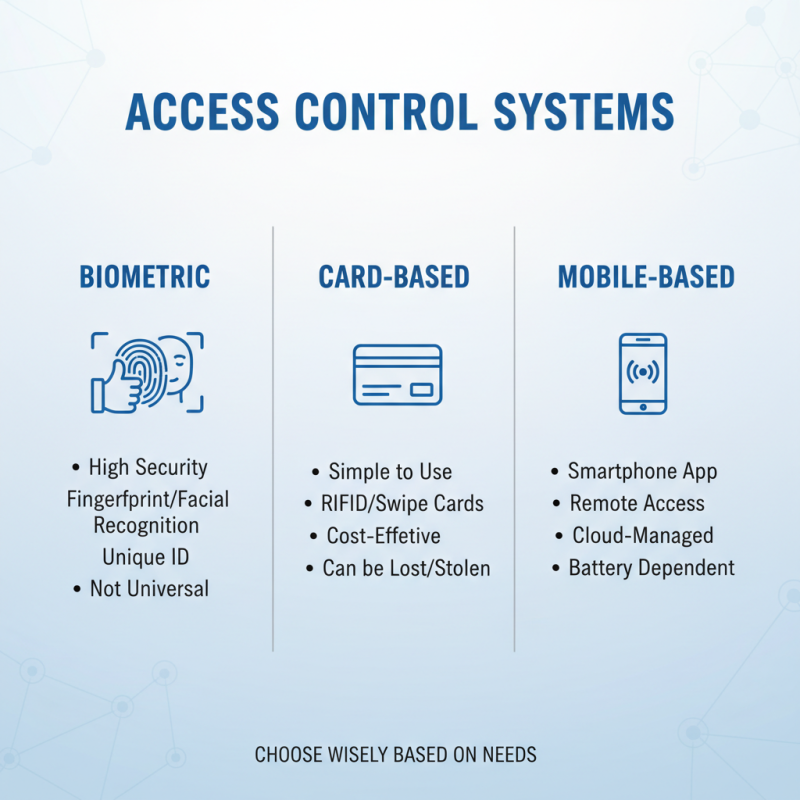
When evaluating different types of access control systems, it’s crucial to understand their unique features. Access control systems can be biometric, card-based, or even mobile-based. Biometric systems offer high security through fingerprint or facial recognition. However, they may not be suitable for every environment. Card-based systems are popular due to their simplicity but can be lost or stolen.
Tips: Consider your business size. For smaller businesses, a straightforward card system can suffice. Larger companies may require complex solutions. Always assess the potential risks before making a decision.
Mobile-based systems are gaining popularity as they offer convenience. Users can unlock doors with their smartphones. This can enhance user experience but may raise concerns about device compatibility. Remember that not all systems integrate well with existing infrastructure.
Tips: Test a system before purchasing. Run a trial to see how well it fits your business needs. Collect feedback from employees. Understanding how they interact with the system is valuable. This step helps avoid costly mistakes down the line.
Assessing Integration Capabilities with Existing Security Systems
When selecting access control software, integration capabilities with existing security systems are crucial. Research indicates that businesses often face challenges in connecting new software with legacy systems. According to a recent report by the Security Industry Association, 55% of organizations had difficulties during integration attempts. This highlights the importance of evaluating compatibility before making a decision.
It's essential to assess how well the chosen software can work with current equipment. For example, many businesses still use traditional CCTV systems, which may not communicate effectively with modern access control solutions. Incompatibility can lead to increased costs and operational inefficiencies. For instance, 70% of users reported a decline in workflow efficiency due to integration issues.
Moreover, consider the software's scalability. As your business grows, so will your security needs. The ability to adapt becomes vital. A study revealed that 60% of companies planned to upgrade their systems within the next two years. Aligning new software with future needs avoids repeated costly investments and disruptions. Evaluate case studies from similar industries to gauge effectiveness and integration success. These steps ensure that you are not just investing in software but choosing a sustainable security framework.
Budget Considerations and Licensing Models for Businesses
When choosing access control software, budget considerations are crucial. Various licensing models exist. They can greatly impact your overall costs. Some systems are subscription-based, while others require a one-time purchase. Think about your budget flexibility. A subscription model often comes with lower upfront costs. However, over time, this can add up.
Tips: Calculate long-term expenses. Factor in upgrades and support fees. Understand how many users you need. A few might qualify for lower rates. Yet, too few licenses can create bottlenecks.
Another point to consider is scalability. Can the software grow with your business? It's important to reflect on future needs. Some solutions may suit your current size but won't accommodate expansion. This could lead to extra costs later.
Tips: Evaluate potential growth. Talk to your team about their needs. They might highlight features worth investing in. Be open to changing your budget as requirements evolve.
How to Choose the Best Access Control Software for Your Business? - Budget Considerations and Licensing Models for Businesses
| Feature |
Basic Package |
Standard Package |
Premium Package |
| User Management |
Up to 50 Users |
Up to 200 Users |
Unlimited Users |
| Mobile Access |
No |
Yes |
Yes |
| Reporting & Analytics |
Basic Reports |
Advanced Reporting |
Custom Analytics |
| Integration Capability |
Limited |
Multiple Integrations |
Full Integrations |
| Price (per month) |
$50 |
$150 |
$300 |
| Support |
Email Support |
Email & Phone Support |
24/7 Support |